
A useful reading connects each finding to the question that prompted the assessment. Here is a practical way to work through the results, discuss them with your patient, and document your reasoning.
What generates the Full Clinical Report?
AI Mov-Scan captures movement through advanced in-shoe motion sensors with embedded AI. Our platform analyzes that capture and generates the Full Clinical Report. Balia explains the available findings and answers questions grounded in those outputs.
The report supports your assessment; it does not replace the patient's history, examination, or your clinical judgment.
1. Confirm which assessment you are reviewing
Check the patient, session date, and selected analysis before reading individual results. Review the assessment purpose, footwear, walking aid where relevant, symptoms, and other circumstances recorded for that visit.
Open My Patients, select the patient, and choose the relevant session in Last Analyses. Use a clear analysis name and comments to distinguish sessions and preserve important context for the next review.
If the context is missing, clarify it before attributing meaning to a comparison. A number without its assessment conditions is an incomplete account.
2. Move from the overview to the details
Start in the General view to orient yourself, then open Details to examine the findings relevant to your assessment question. Work from the overall picture toward the specific parameters you need to understand. The interactive views and exported report serve different reading formats, so their layouts can differ.
Depending on the analysis, familiar terms may include:
| Term | What to establish when reading it |
|---|---|
| Cadence | The number of steps per minute, as defined for the displayed analysis. |
| Stride length | The distance covered by one foot over a gait cycle; do not confuse it with step length. |
| Contact time | How long the foot remains in contact with the ground during a step. |
| Swing time | How long the foot is in the air during the gait cycle. |
These terms describe aspects of movement, not treatment targets. Read each result with its displayed unit and definition. The parameters available depend on the analysis performed.
3. Separate an output from its clinical meaning
A reported value describes an aspect of the captured movement. Deciding why it matters requires the patient's history, symptoms, examination, and the limitations of the measurement.
A color or left-right difference can draw your attention to a finding, but it is not a diagnosis or a treatment instruction. For a reference comparison, check what the reference represents and whether it is relevant to the assessment.
Also distinguish the sensing method from the visualization. Baliston captures motion, not direct plantar pressure. A movement chart should not be read as a measured pressure map.
4. Review comparisons with their context intact
To review change, select Compare from an analysis menu and choose another session for the same patient. Check the two session dates and assessment conditions before interpreting the difference.
Consider whether the same task and parameter were assessed, what else changed between visits, and the measurement variability relevant to the result. A numerical difference is not, by itself, proof of improvement or treatment effectiveness.
For an orthotic follow-up, preserve the footwear and orthotic conditions in the accompanying clinical record. Do not assume the comparison automatically accounts for those differences.
5. Use Balia to explain the findings
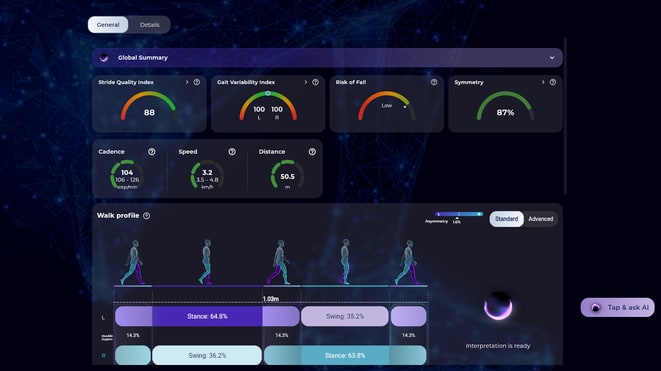
You can move from a result to a plain-language explanation without losing sight of the report. For example, ask:
- "Explain the displayed cadence result in plain language."
- "Summarize the differences already shown in this comparison."
- "Which findings in this report should I review more closely?"
Review Balia's answer alongside the finding it explains. Keep the patient's history and examination in view, particularly when a result raises a question that the recording alone cannot answer.
Balia can suggest an area for practitioner review. It does not prescribe an exercise, adjust an orthotic, or make a clinical decision.
6. Document your interpretation and share appropriately
Keep the platform findings, your interpretation, and your plan distinguishable in the clinical record. To export, open the selected analysis, choose Export from its menu, and follow the export steps. Review the resulting file before adding it to the record or sharing it.
Before sharing, check the selected patient and session, the exported content, the intended recipient, and your practice's privacy requirements. An export can support communication, but does not establish an automatic integration with your record system.
Can patients read the report without an explanation?
The report can support a conversation, but a chart should not be left to imply its own clinical meaning. Explain the findings you consider relevant, their limitations, and the next steps you have agreed.
What if the results do not match the examination?
Review the session and assessment conditions. If results differ significantly from your clinical observations, contact our support team so we can help investigate. Use your clinical judgment rather than forcing the examination to fit the output.
Explore Baliston Health for podiatry or request a report walkthrough.


